Annotation and Markup SDK Libraries
LEADTOOLS SDKs include flexible and time-tested document and image annotation libraries for .NET 6+, .NET Framework, .NET MAUI, Xamarin, UWP, C++ Class Library, C#, VB, C/C++, Java, Objective-C, Swift, and HTML / JavaScript developers. LEADTOOLS libraries include a clean and diverse collection of markup objects and collaborative tools designed to impart visual metadata to digital images and documents, which enhance user experience, productivity, and security. In addition to its award-winning annotation API, LEADTOOLS also supports specialized document and medical annotations for industry standard formats, including PDF and DICOM.

Robust Annotation Components
The LEADTOOLS annotation libraries provide APIs and UI controls to add full-color annotation and markup objects to bitonal, grayscale, and color images and documents.
- Objects can be drawn onto a presentation layer or burned permanently into the image
- Annotation security APIs provide security to edit annotations and remove redaction objects from private information
- Many annotation object types are pre-defined, or you can create new custom object types
- All LEADTOOLS annotation objects can be hyperlinked to show user-defined messages, run applications, or load a web page.
- Objects can be flipped, reversed, rotated, scaled, sheared, and translated
- Annotations can be stored in the image file, in a separate annotation file, in a database, or in memory

Document Annotation and Mark up Libraries
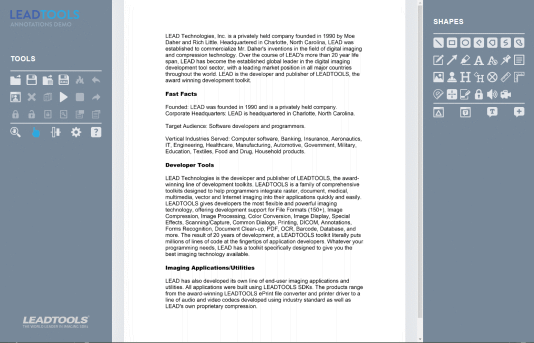
LEADTOOLS libraries support several industry standard annotation formats, including PDF, IBM FileNet P8, and Daeja annotations. In addition to the objects that those formats support, the libraries include a broad range of document annotation objects, including redaction, text, geometric shapes, rulers, Bates stamps, audio, and video. The text-based review and collaboration objects are similar to Adobe Acrobat and Microsoft Word. The document can remain searchable, even after it has been marked up or redacted.
- Underline
- Strike
- Highlight
- Redact

PDF Annotation Libraries
LEADTOOLS PDF libraries provide APIs to read, display, edit, and write PDF annotations and markups that work seamlessly with Adobe Acrobat and other compliant PDF readers. By annotating and marking up PDF files, users can collaborate by writing comments and drawing shapes on top of the document without making permanent changes. Additionally, sensitive information can be permanently or temporarily redacted to help your application comply with standards such as GDPR and HIPAA.
The LEADTOOLS PDF libraries provide APIs to load, view, edit, create, and save the following PDF annotations:
- Arrow
- Highlight
- Intent
- Leader
- Line
- Line Endings
- Redaction
- Review
- Shapes
- Text
- Text Callout
- Note reply
- Transformation
- Comments and replies

DICOM and Medical Imaging Annotation Libraries
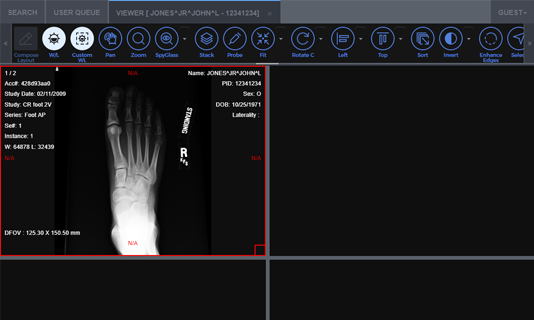
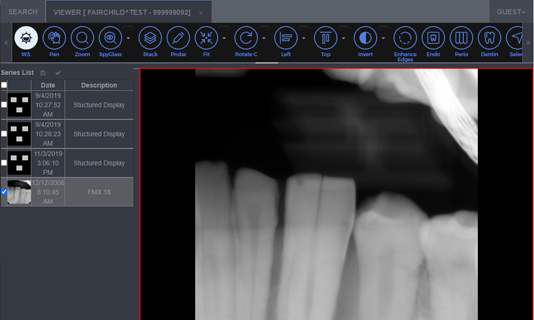
A broad range of DICOM and medical image annotation objects are included in the Medical Image Viewer and Medical Workstation Viewer controls. These medical image annotations can be added to DICOM, bitonal, color, and grayscale images, either on a presentation layer or burned into the image data. They are perfect for highlighting areas of interest and redacting private information. Access to edit annotations or view private information can be control with user-level passwords. Flexible annotation object storage options include DICOM data sets (Grayscale Softcopy Presentation State), image files, separate annotation files, database, memory, and XML.
- Audio
- Video
- Cross Product
- Encryption
- Freehand
- Pointer
- Polyruler
- Protractor
- Redaction
- Ruler
- Text
- Text Pointer

Annotate Images in HTML5 and JavaScript Apps
The LEADTOOLS annotations library for HTML5 and JavaScript is a powerful framework that adds the full power of LEADTOOLS desktop annotations to many browsers and devices.
Check out the live demos to see the HTML5 annotations in action.

Implement Annotation Security for Each and Every Object
The annotation security APIs provide security to edit annotations and remove redaction objects to gain access to private information. Enhanced redaction objects hide and encrypt confidential parts of images and documents even in non-LEADTOOLS viewers. When combined with annotation security, these redact objects provide a means of granting user-level access to view redacted areas of an image or document.

Versatile Storage of Annotations
LEADTOOLS annotations can be stored as an external annotation file, XML, private DICOM data elements, within a TIFF file as LEADTOOLS or Wang annotation tags, or in PDF documents as native PDF annotations. Alternatively, annotations can become a permanent part of the data or exported as SVG or EMF.

Ease of Use and Control
The simplicity of using LEADTOOLS annotations is extended to both the developer and the end-user. With very little code, the developer can create a fully automated, dynamic, and feature-packed annotation application, which is also easy to operate by the end-user. Automation features include mouse event handling, cursors, toolbars, right-click context menus, and instant text editing.
With the LEADTOOLS Annotation Customizable Features, developers can create new annotation types, change the context menus and toolbars, and localize the dialog strings. End-users can rotate, calibrate, and change virtually any visual setting of the annotations on the screen.

Annotation and Markup SDK Platforms and Programming Interfaces
Operating Systems
Projects that use LEADTOOLS Annotation and Markup libraries can be deployed to Windows, Linux, macOS, Android, iOS, and Web devices.
Frameworks
Developers that are leveraging these frameworks can utilize the Annotation and Markup SDK: .NET 6+, .NET Framework, .NET MAUI, Xamarin, UWP, WinForms, C++ Class Library, ASP.NET, and Web Services / Web API (JSON, SOAP, REST)
Programming, Scripting, Markup
Annotation and Markup code snippets and demo applications are provided for the following: C#, VB, XAML, C/C++, Java, Objective-C, Swift, and HTML / JavaScript
Start Coding with LEADTOOLS Annotation and Markup
Annotation and Markup libraries as well as all LEADTOOLS Recognition, Document, Medical, Vector, and Imaging technologies for all development and target platforms, including Windows, Linux, and macOS.
Documentation
- Implement Annotations in C#, VB.NET, Java, Obj-C, and Swift
- Burn Annotations to an Image - .NET Core Console C#
- Load, Save, and Split Annotations - .NET FX Console C#
- Create a Custom Annotation - WinForms C#
- Create a Custom Annotation - WPF C#
- Draw and Edit Annotations on Images - WinForms C#
- Draw and Edit Annotations on Images - WPF C#
- Load, Add, and Save Annotations - Java
- Implement Annotations in C/C++
Code Samples
- Programmatically Edit Text Annotations in HTML5/JavaScript
- Load, Save, and Split Annotations in C#
- Create PDF Annotations and Markups in C#
- Detect and Redact MICR from Files in C#
- Use MutationObserver with ImageViewer and Annotations in JavaScript
- Add Bates Stamp Watermark to Images in C#
- Convert PDF Annotations to P8 Strings in C#
- Convert P8 Annotation Strings to PDF Annotations
- Convert to and from TIFF Wang Annotations
- Copy and Paste Annotations with Document Viewer in HTML5/JavaScript
- DICOM Annotations in .NET Medical Viewer in C#